You start the day with a clear list of tasks. By noon, half the day is gone and you've barely touched it. Meetings ate up the morning. A "quick" Slack thread turned into an hour-long discussion. You answered thirty emails but didn't make progress on anything that actually matters.
Sound familiar? The problem isn't your to-do list. The problem is that a to-do list tells you what to do but not when to do it. Without a time commitment, tasks float in an aspirational void, waiting for a "good moment" that rarely comes.
Time blocking fixes this.
Software engineers who protected at least one 2-hour focus block daily completed complex tasks 47% faster with 38% fewer bugs (Microsoft internal research). Time blocking isn't a scheduling preference; it's a performance multiplier.
What Is Time Blocking?
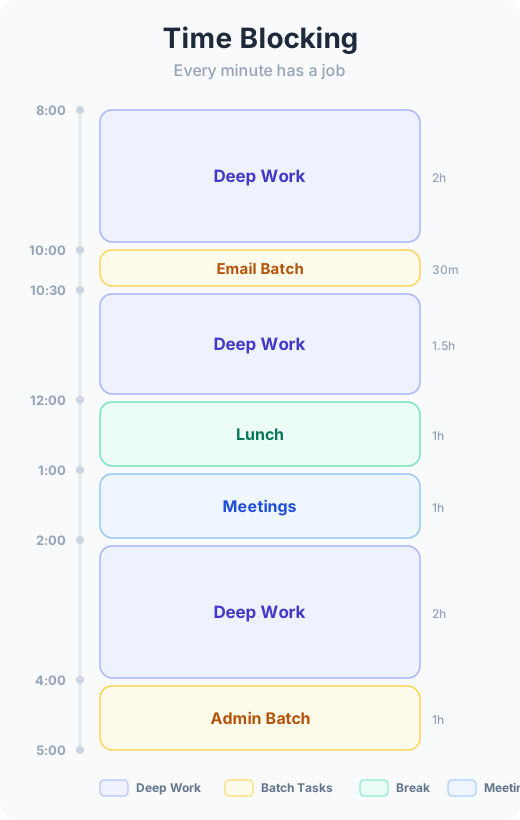
Time blocking is the practice of assigning every hour of your workday to a specific task or category of work. Instead of a loose to-do list and a hope that you'll get to things, you create a concrete plan: "From 9:00 to 10:30, I write the project proposal. From 10:30 to 11:00, I process email. From 11:00 to 12:00, I have my team standup and then handle follow-up tasks."
Cal Newport, the computer science professor and author of Deep Work, is perhaps the most vocal advocate. He's time-blocked every workday for over a decade and credits the practice with allowing him to publish multiple books, earn tenure, and raise a family, all without working past 5:30 PM.
The key insight: a task scheduled on your calendar is dramatically more likely to get done than a task sitting on a list.
Four Types of Time Blocks
Not all blocks are created equal. Understanding the different types helps you build a realistic schedule.
Task blocks
These are dedicated slots for specific tasks. "Write quarterly report: 9:00-10:30." They work best for deep, focused work that requires sustained attention. Protect these blocks aggressively.
Batch blocks
Group similar small tasks into a single block. "Email and messages: 11:00-11:30." Instead of checking email all day, you batch it into defined windows. This reduces context switching and keeps your deep work blocks clean.
Buffer blocks
Leave empty blocks between commitments. These are your shock absorbers. Meetings run long. Tasks take longer than expected. Urgent things come up. Buffer blocks give you room to absorb these without blowing up your entire schedule.
Personal blocks
Block time for lunch, exercise, commute, or family commitments. If it's not on the calendar, it gets squeezed out. Treating personal time as real calendar events protects your wellbeing from the creep of "just one more thing."
Plan Your First Time-Blocked Day
Here's a step-by-step you can follow tonight to time-block tomorrow:
Step 1: List your commitments. Write down every meeting and fixed appointment for tomorrow. These are immovable; they form the skeleton of your day.
Step 2: Identify your top 3 tasks. From your to-do list, pick the three most important things you need to accomplish. Be realistic. Three is enough.
Step 3: Assign your #1 task to your best hours. For most people, this is the first block of the morning before meetings start. Give it at least 60-90 minutes. This is your deep work block.
Step 4: Slot in tasks #2 and #3. Find gaps between meetings and assign these tasks. If there aren't enough gaps, one of these tasks needs to move to another day. That's fine. Better to plan honestly than to create a fantasy schedule.
Step 5: Add batch blocks. Designate two email/messaging windows: one mid-morning, one mid-afternoon. Thirty minutes each is usually enough.
Step 6: Add buffer blocks. Leave 15-30 minutes of unscheduled time after every two-hour stretch. You'll need it.
Step 7: Block personal time. Lunch, commute, end-of-day shutdown. Put them on the calendar so they're real.
A Sample Time-Blocked Day
| Time | Block Type | Activity |
|---|---|---|
| 8:00 - 8:15 | Startup | Daily review, plan the day |
| 8:15 - 9:45 | Task block | Deep work: write project proposal |
| 9:45 - 10:00 | Buffer | Stretch, refill coffee |
| 10:00 - 10:30 | Batch block | Email and Slack triage |
| 10:30 - 11:30 | Meeting | Team standup + follow-ups |
| 11:30 - 12:00 | Task block | Prepare slides for Friday |
| 12:00 - 12:45 | Personal | Lunch (away from desk) |
| 12:45 - 2:15 | Task block | Code review and feedback |
| 2:15 - 2:30 | Buffer | Walk, reset |
| 2:30 - 3:00 | Batch block | Email, messages, quick tasks |
| 3:00 - 4:00 | Meeting | Project sync |
| 4:00 - 4:45 | Task block | Finish slides or overflow work |
| 4:45 - 5:00 | Shutdown | Review tomorrow, close loops |
Notice the structure: deep work first, meetings clustered where possible, batch blocks for communication, buffers between intense stretches, and clear start/end boundaries.
Handling Interruptions and Re-Blocking
Here's the truth about time blocking: your plan will break. Every single day. Someone will need something urgent at 9:15. A meeting will run 20 minutes long. You'll underestimate a task.
This is normal. The point of time blocking is not to create a rigid schedule that never changes. The point is to have a plan, so that when things change, you can make intentional choices about what to adjust rather than just reacting all day.
When your plan breaks, re-block. Take 60 seconds to look at the rest of your day and shift things around. Move the displaced task to an open buffer block. Push something less important to tomorrow. The act of re-planning takes a minute but keeps you in control rather than reactive.
Cal Newport re-blocks two or three times on a typical day. That's not a failure of the method. That's the method working.
Why Most People Fail at Time Blocking (and How to Avoid It)
Overscheduling
If every minute is blocked with no breathing room, one disruption cascades into a ruined day. Always leave more buffer than you think you need, especially when starting out. A good rule: block no more than 60-70% of your day with specific tasks.
Knowledge workers who adopted daily focus blocks saw a 23% improvement in output quality and 37% improvement in project completion rates within 90 days. But only when they left enough buffer for reality to intervene.
Ignoring energy levels
Putting your hardest task at 3 PM because that's when you have a gap is a recipe for procrastination. Match task difficulty to your energy curve. Deep work goes in your peak hours. Administrative work goes in your valleys.
Being too rigid
If you treat the time block as a prison sentence, you'll rebel against your own system. If you finish a task early, enjoy the extra buffer. If inspiration strikes during a batch block, let yourself follow it for a few minutes. The blocks are guardrails, not handcuffs.
How Actium Supports Time Blocking
The weekly review in Actium is a natural place to plan your time blocks for the coming week. As you review your projects and upcoming tasks, you're already thinking about what needs to happen and when. Contexts in Actium, like @deep-work, @calls, or @errands, align naturally with block types: deep work tasks go in task blocks, calls go in batch blocks, errands get their own dedicated window.
During your daily review, you can fine-tune tomorrow's blocks based on what actually happened today. The review becomes your planning ritual, and the time blocks become your execution structure.
Start With One Block
You don't need to time-block your entire day tomorrow. Start with one block: protect 90 minutes in the morning for your most important task. Put it on your calendar. When someone tries to schedule a meeting during that window, say no. See how it feels to have dedicated, protected time for work that matters.
Once you experience the clarity of a time-blocked morning, you'll want to extend the practice to the rest of your day. In a world where the average worker is productive for less than 3 hours a day, one protected 90-minute block isn't just helpful; it might be the most valuable thing you do.
Time blocking pairs naturally with Eat the Frog for choosing what goes in your first block. For protecting those blocks from distraction, read Deep Work in Practice. And for the daily and weekly rituals that feed into your time-blocking plan, see The Power of a Daily Review.